Someone posted in a remote work group last year asking for help. She makes sixty calls a day, eight hours at a stretch, and she wanted tips on writing down what happened afterwards. Thirty people answered.
Nobody solved it for her.
The advice was the advice you would expect. Use shorthand. Do not write every word. Fill the gaps in straight after you hang up. All of it sensible, none of it the thing she was missing.
Searches for phone call notes have climbed hard over the last year, and that thread is one of thousands. So before you install anything, it is worth being clear about which problem you actually have. Because three different problems share this name, and the tools that solve one are useless against the others.
Why everyone is suddenly asking this
Search interest in phone call notes has multiplied over the past year, which is unusual for a phrase this old. Two product launches explain most of it.
Google put Call Notes on the Pixel 9, where it transcribes and summarises a call on the device. Samsung answered with Transcript Assist inside Galaxy AI. Both got heavy advertising, both landed within roughly a year of each other, and between them they taught several million people a phrase they had never used before.
So many of the people searching now are not looking for a method at all. They saw a feature demonstrated, went hunting for it on their own phone, and came up empty. Google’s version needs a Pixel 9 or later plus a SIM from one of a handful of countries. Samsung’s needs a recent Galaxy, a network connection and a Samsung account.
The rest arrive from the opposite direction. They already take notes, badly, on paper or in a notes app, and they want to know whether a better way exists. That second group is larger, though it gets the worse answers, because the pages that rank were written to sell transcription.
Three different things people call a phone call note
Sort yourself into one of these first. It saves you a month.
A transcript. Word for word, what was said, usually made by AI, usually delivered after the call ends. Google and Samsung both build this in now, and a dozen apps sell it.
A running record about a person. Not what was said on one call, but what you know about this client across every call. What they want, what you promised, where you left off.
A form to fill in. Think template or log sheet, often printed, usually for a front desk logging messages for somebody else.
Most people arrive searching for the first, because that is what gets advertised. Then they discover they needed the second.
The quickest way to tell them apart: ask what you would want to look at six months from now. If the answer is a conversation, you want a transcript. But if the answer is a person, you want a record. Almost every complaint in those threads is about people.
What the AI transcribers do, and what they cost
These have improved enormously and I want to be fair to them.
Google’s Call Notes runs on Pixel 9 and later, transcribes on the device with Gemini Nano, and drops a summary into your call log. Samsung’s Transcript Assist does the same job from a recording. Plaud, Beside, Superscribe and a dozen others sell the standalone version.
If your work depends on exactly what somebody agreed to, use one. A transcript settles arguments in a way that your memory cannot.
Still, three costs are worth knowing before you commit.
First, the other person usually gets told. Google’s implementation announces it. That changes some conversations, and in a few US states you need consent anyway.
Second, most of them need a network connection and an account. Samsung’s requires both.
Third, and this is the one nobody warns you about: volume.
The transcript problem nobody mentions
Take ten calls a day and a transcriber hands you ten transcripts.
After a month you have two hundred. By the end of a year, two and a half thousand, each one several hundred words long, each one containing the weather, the small talk and the bit where somebody’s dog barked.
You will not read them. Nobody reads them.
What you will do instead is search them, occasionally, when something has already gone wrong and you need to prove what was agreed. That is a real use and it is worth something. But it is forensic, not practical. It helps you after the damage.
The thing that would actually have helped is one line, written by you, that you can see before you pick up. A transcript cannot be that, because a transcript is long and it did not exist yet when you needed it.
What about just recording everything?
Worth addressing, because it is the first thing most people try. The full version lives in its own post, on how to record phone calls on Android and what to do with the recordings afterwards.
Recording is legal across most of the US under one-party consent, meaning you may record a call you are part of. Roughly a dozen states instead require everyone to agree, and the stricter rule can follow the other person’s location rather than yours, so a call across a state line sometimes lands you under a law you did not expect. Spend ten minutes on your own state before switching anything on, because I am a real estate agent rather than a lawyer.
Beyond the law, a recording carries the same defect as a transcript and rather more of it. It is long, it is unsearchable until something transcribes it, and it leaves you relistening to a nine minute call to recover one sentence.
So record when the stakes justify it. Do not record as a substitute for deciding what mattered.
What the usual advice gets wrong
Read enough of these threads and the same four suggestions come round.
Use shorthand. Genuinely useful, though it addresses speed rather than the real problem. Faster notes you still cannot find in June are faster useless notes.
Put it on speaker and write with a stylus. The standard answer on Android forums since about 2019. It works. That approach also assumes you are sitting at a desk, which is not where most calls happen.
Use a template. Search this topic and you get printable call log sheets and Notion templates. Those are built for a receptionist taking a message on somebody else’s behalf: who rang, when, what to pass on. When the call is your own client, the template is the wrong shape entirely.
Let AI do it. Covered above. That solves recording, not retrieval.
Every one of these treats note-taking as a capture problem. Capture is not where it breaks. Almost everybody who complains about call notes can tell you what happened on the call. They simply cannot get back to it six weeks later when the person rings again.
What a phone call note should actually contain
Three things, in this order. What they want. Then what you promised. When you said you would come back to them.
That is it. Four lines, forty seconds, written while the call is still in your head rather than at six in the evening when it has blurred into the other nine.
A few rules that matter more than the format.
Write numbers, not adjectives. “Keen” tells you nothing in April. “Will go to 5% under asking” tells you everything.
Always write the promise. Most of the damage in client work is not forgetting a person, it is forgetting a commitment you made to them.
Never write anything you would mind them reading. Notes sync to devices, devices get shared, and screens get seen over shoulders.
Date each new line and push the old one down rather than overwriting. Eventually those dated lines become the most valuable thing you own about that person, and I have written more about how to structure them and where to keep them.
After three conversations a note looks like this, newest first:
14 Mar — Countered at 760, she is holding at 750. Said I would call Monday either way.
2 Mar — Second viewing, brought her sister. Sister hated the driveway, she did not care.
19 Feb — First call. Relocating from Phoenix, wants 3BR, 5% under ask, weekends only.
Nine lines, built forty seconds at a time. No transcriber would have produced that, because most of what makes it useful is judgement about what mattered rather than a record of what was said.
Taking notes while you are still on the call
This is a separate skill from deciding what to record, so here is the practical version.
Put the call on speaker. It sounds obvious. Most people do not, and then try to write one-handed with a phone wedged against their shoulder.
Do not attempt a transcript by hand. You cannot listen and transcribe at once, and the attempt is why people miss the thing that mattered. Capture nouns and numbers only. Addresses, prices, dates, names.
Then, in the ninety seconds after you hang up, turn those fragments into the three lines above. That gap is the whole technique. Skip it and the fragments mean nothing by Thursday.
If you take back-to-back calls, build the gap into your day deliberately. Nine calls with no space between them produces nine sets of notes you cannot decode.
Where you put the note decides whether it works
Here is the part that took me embarrassingly long to work out.
A note you cannot see at the moment the phone rings is not a note. It is a diary entry.
Put your notes in a notes app and you have to remember the person’s name, open the app, and search, all while they are talking. Nobody does this. The note might as well not exist.
Put them in a CRM and you have solved it properly, provided you pay thirty to fifty dollars a month and you actually finish the setup. Plenty of solo operators start that and never finish, which is a separate conversation I have had at length about whether a solo agent needs a CRM at all.
Put them in the contact record itself and the note lives with the phone number, which is the only identifier you reliably have when a call comes in.
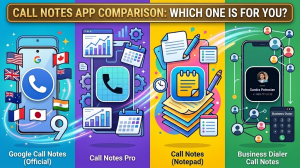
A handful of apps were built to close that gap directly. The best known of them, Call Notes Pro, stopped being updated in 2022, and I have written separately about what happened to it and what its users should do now.
That last one is free, and it is where I keep mine. Three hundred and sixty clients, four labels, a note on each.
Two other places people try, for completeness.
A spreadsheet works surprisingly well for a while, then fails the moment you are away from a laptop, which is exactly when calls happen.
One note per person in a notes app is the most common improvised system I come across. Honestly, it beats nothing. Still, it depends on you searching a name you may not have caught, and notes apps do not know that a phone is ringing.
The psychology of why a remembered detail works
Three experiments published in the Journal of Consumer Research in 1995 found that remembering a customer’s name made them measurably more likely to agree to a purchase request.
The mechanism was not the name itself. People read being remembered as a compliment, and that perception is what moved their behaviour.
Forgetting, oddly, did not hurt in the same way. So recall is a bonus rather than the avoidance of a penalty, which is exactly why the note you write tonight pays you back next spring.
I set out the full evidence, including the studies that complicate it, in the psychology of remembering.
The gap that is still there
Even in the contact record, though, your phone will not show you the note while it is ringing. You get a name. Not the company, though, because Google’s Phone app leaves that field off the screen no matter how carefully you filled it in, and I traced why Android hides the company name on the incoming call screen in a separate post.
Samsung confirmed as much in its own support forum: contact notes never appear in the call log, so you have to open the contact to read one. That is also true of the incoming call screen, and I went through the whole picture in a separate piece on what Samsung actually offers.
So the note is written, stored and synced, and it is still not in front of you during the two seconds that decide how the call opens.
I should be straight about my interest here. As a working real estate agent, I built an Android app that closes exactly that gap, which is why I have spent this long thinking about it.
It shows your Google Contacts note on the incoming call screen, before you answer. Edit it during or after the call and it writes back to Google Contacts, so your address book stays the single copy. It works offline, because it reads your contacts instead of calling a server. Pricing is $9 a month, $49 a year or $99 once, with a 30 day trial. Android only.
When you should ignore all of this
Four situations where the above is wrong.
You need the exact words. Legal, compliance, disputes, anything where the record must be defensible. Use a transcriber and keep the recording.
You take five calls a week. Of course you will remember. Writing a system around nine calls a month is a hobby, not an improvement.
Somebody else needs the notes. A shared record means a real CRM, with permissions and a history of who changed what. Contact notes cannot do handoffs.
You never write anything down. No tool fixes an empty field. If you have not written a note in a year, the first month is you building the habit, and the software is not the hard part.
The short version
Decide which of the three things you needed. Almost everybody who searches for this wanted the second one, a running record about a person, and got sold the first.
Write three lines after each call. What they want, what you promised, when you will come back.
Keep them on the contact, not in a notes app, because the phone number is the only thing you can search on when the phone is already ringing.
Then work out how to get those lines onto your screen before you answer. That last step is the one that turns a filing habit into a business advantage, and it is the step almost nobody completes.