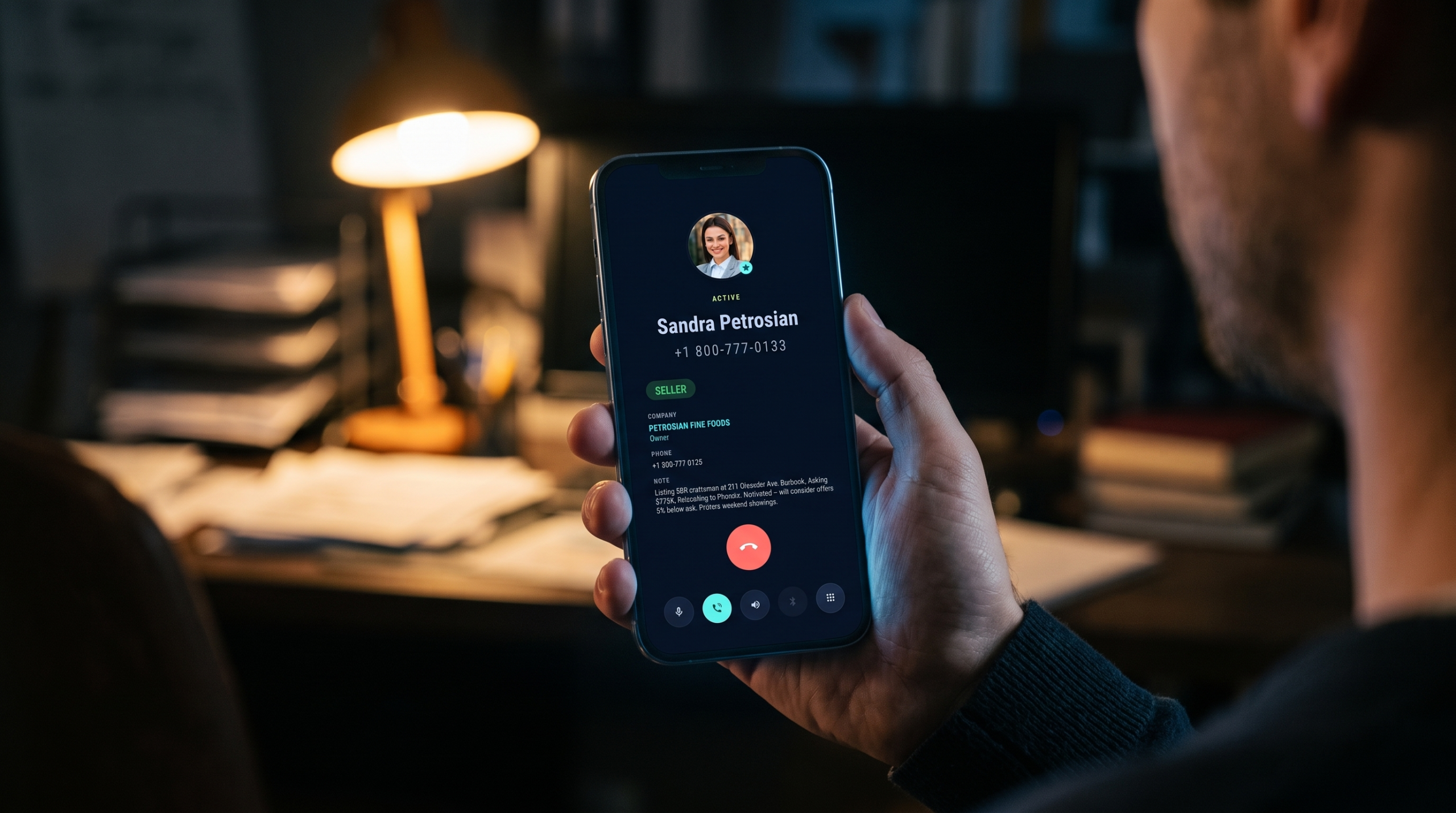
On 22 May 2015 somebody opened a feature request with Google, asking for the company name on the incoming call screen. The title was plain: show the “Company” and “Title” fields when the phone rings.
Three lines of reasoning came with it. When you have a lot of work contacts, you don’t remember people by name alone. You need the company to place them, and you need it before you decide whether to pick up.
Dozens of people turned up over the following years to agree. Then, in August 2020, a Google engineer closed the thread with two words: Won’t Fix. The resolution given was “Obsolete”.
People kept commenting anyway. The most recent one arrived in May 2026, eleven years after the request went in, and it says the same thing everyone else said: still waiting for that simple improvement.
So if you have been hunting for a way to get the company name on the incoming call screen and found nothing, the fault isn’t yours. Android’s own Phone app doesn’t print it, and Google decided not to build it.
One disclosure before the detail. I sell an Android dialer that does exactly this, so weigh what follows accordingly. The free workarounds come first, and I’ll say plainly where they’re good enough.
Why the company name is missing from the incoming call screen
Open any entry in Google Contacts and you’ll find a Company field and a Job title field sitting there. Fill them in. Nothing changes.
The incoming call screen prints the contact’s name, the photo if you saved one, the number, a carrier label and sometimes a spam warning. That is the whole list. No company name on the incoming call screen, and no job title either.
Meanwhile the data you typed is still in the contact, two taps away, on a screen you can’t reach while the phone is ringing. The information exists. It just never arrives at the moment you need it.
Mostly this bothers one kind of person: the one whose phone book is work. Suppliers and clients. Three people called Peter, from three different firms. That agent you spoke to once in March.
A name alone identifies none of them.
Eleven years of the same request
The dates are worth laying out, because they explain why no article on this exists and why the forums keep filling up.
- May 2015. The original request lands in Google’s issue tracker, asking for Company and Title on the call screen.
- 2015 to 2020. Dozens of comments pile up. Several point out that other platforms already do it, and one person says plainly that serious business cannot be done on a phone that hides which company a caller belongs to.
- August 2020. Google closes the request. Status: Won’t Fix, Obsolete.
- January 2023. Somebody opens a fresh thread with the identical title, and Google marks it Accepted the next day.
- November 2023. That second thread gets reset to New. No update has appeared since, and it now carries 152 upvotes.
- May 2026. The newest comment on the dead 2015 thread, from somebody evidently still waiting.
Accepted means logged, not promised. So treat the feature as absent and plan around it.
The official fix for a company name on the incoming call screen
Search this problem and you land on a Phone app Help thread from September 2022. Replies on it are locked now, and 278 people have marked “I have the same question”.
The answer from the Product Expert: if the number is saved in Google Contacts, put the name of the company in the First name and Last name fields.
That genuinely works. Type “Peter Nagy Riverside Supplies” into the name fields and your call screen shows “Peter Nagy Riverside Supplies”, because the screen prints the name field and the name field now holds everything.
Look at what you traded for it, though:
- Your contact list sorts by whatever word you put first, so alphabetical order stops meaning anything.
- Searching for a person now competes with company text in the same field.
- That mangled name then follows the contact everywhere Google Contacts reaches. Gmail, calendar invites, the address autocomplete in every Google app.
- Somebody changes job and you edit their name instead of a job field, which is the kind of edit people quietly skip.
- Doing it once is fine. Repeating it across a phone book you have built for years costs you an evening you won’t get back, and one commenter on that 2015 thread counted 1,300 contacts and refused on principle.
When the hack is the right call
For ten or twenty names, use it. Honestly. A handful of people you must place instantly are worth five minutes of typing, and no app purchase beats five minutes of typing.
Above that number, the maintenance becomes the problem rather than the setup. Still, start here before you spend money, because twenty contacts may turn out to be all you needed.
The three seconds before you answer
There is a reason this request keeps coming back after eleven years, and it isn’t tidiness.
A ringing phone gives you about three seconds to make two decisions. First, whether to take the call at all. Second, what to say when you do.
Both decisions need context rather than a name. “Peter” tells you nothing.
Now try the other version. “Peter, Riverside Supplies, the quote you chased on Tuesday.” That tells you whether to step out of the meeting. It also hands you an opening sentence that sounds like you remembered him.
Answering the phone slightly better than your competitor is not a small edge in a business built on calls. After all, the other side can hear the difference between somebody who placed them instantly and somebody who stalled.
What those three seconds do, psychologically
That opening is worth more than it looks. A meta-analysis of 106 studies found that patients whose doctor communicated poorly were 19% more likely to ignore the treatment they were given, and training doctors to communicate better raised adherence odds by 1.62 times.
Selling is not medicine, of course. Still, the pattern holds wherever somebody has to act on advice: context delivered early makes people more likely to follow what you tell them.
The research behind that, with its limits, sits in the psychology of remembering.
Does any phone show the company name on the incoming call screen?
Some do. Across the Google threads, a OnePlus community post and a feature request on the e/OS forum, people report seeing the organisation on the call screen. The brands named are Samsung, Xiaomi, Huawei, Oppo and OnePlus.
A few mention BlackBerry handling it years ago. Several say they only noticed the gap after moving to Android from an iPhone. Samsung owners have a related wrinkle of their own, which I covered in the Samsung call notes replacement post.
Treat those as user reports, not a specification. Manufacturers rewrite their dialers between versions, and a behaviour that exists on one phone in one country may be missing on the next.
Google’s own Phone app, which ships as the default on Pixel and on plenty of other handsets, does not show it. That part is settled, because Google closed the request rather than shipping it.
Test your own phone in two minutes
Open the Contacts app, pick somebody, tap Edit, and fill in the Company field. Then ask that person to ring you, or call yourself from a second phone whose number you’ve saved the same way. Watch what appears while it rings.
Now you know, and you can stop reading forum threads about phones you don’t own.
A different fault: no name at all
Some people arrive at this question from a worse place. Their phone shows a bare number for people who are definitely saved, so the company field is the least of it.
Three causes explain most of those cases.
The usual one is formatting. A number saved as 06 20 123 4567 may not match the same number arriving as +36 20 123 4567, so store everything in international format and the matching stops failing.
Next, check which account the contact lives in. Contacts saved to the SIM, or to a second Google account that is no longer syncing, stay invisible to the dialer.
Finally, look at permissions. A phone or contacts app that has lost its Contacts permission shows numbers and nothing else, and that one hides itself well after a system update.
Fix those first. There is no point buying anything while your phone can’t match a saved number to a saved person.
Caller ID and spam protection answers a different question
Half the advice online points you at Settings, Caller ID and spam. That feature is real and worth switching on. However, it solves another problem entirely.
What it does is look up numbers that are not in your contacts, then name the business behind them from Google’s directory.
For a client already saved in your phone, it changes nothing at all.
A second confusion is worth clearing up. Perhaps what you actually want is your company name appearing on your customers’ screens when you ring them. None of this applies to that.
Such branding happens at carrier level, under the names CNAM and branded caller ID, and you buy it from your phone provider or VoIP vendor. Different problem, different budget. Search for “branded caller ID” instead.
How a dialer puts the company name on the incoming call screen
This is the part about my own app, so discount it as you see fit.
Business Dialer Call Notes takes over the phone app role on Android. Then it prints the context on the incoming call screen itself: company, job title, your own note about the person, and the labels you already keep in Google Contacts, such as VIP or Buyer. Email, address and the SIM the call arrived on come along too.
Your notes live in your own Google Contacts rather than on my servers. Because of that they sync to your other devices, and you can export them whenever you like. Delete the app one day and they stay exactly where they are. Offline works too, since nothing needs a lookup.
Pricing is $9 a month, $49 a year or $99 once, with a 30-day trial. No free tier exists, and the Play listing says so in the first paragraph.
What to write in the note
Company and job title take care of themselves, since you copy what is on the business card. The note is where people freeze.
Keep it to the sentence you would want whispered in your ear while the phone rings. Who they are to you, and what you owe them next.
“Buyer, 2-bed, viewing booked Thursday” beats three paragraphs of history, because you have to read it in the time it takes to lift the phone. Anything longer belongs in the body of the contact, where you can read it afterwards.
Dates age badly, as well. Write “quote sent, chasing” rather than “sent quote on the 4th”, and the note stays true for weeks instead of going stale overnight.
What it won’t do
It doesn’t change Google’s Phone app. Nothing can, which is the whole reason this post exists. Instead it replaces that app, which means setting it as your default phone app. Should handing over your dialer feel like too much for a company name, that’s a fair place to stop.
Unknown numbers stay unknown, as well. The app reads your contacts rather than a business directory, so a cold call from a number you’ve never saved shows up as a number you’ve never saved.
Transcripts and AI summaries are missing too. Google’s own Call Notes on recent Pixels records and summarises calls properly, so buy that instead when transcripts are the job. I compared it with everything else in four things called call notes on Android. Recording is a separate subject again, so I set out the recording options on Android in their own post.
Finally, iPhone users get nothing from me. The app is Android only.
Three ways to get the company name on the incoming call screen
| Approach | What you do | What it costs you |
|---|---|---|
| Company in the name field | Retype the name of every contact who matters, adding the firm | Free, but it breaks sorting and search, and it spreads to Gmail and Calendar |
| Your manufacturer’s dialer | Check the caller identification settings on a Samsung, Xiaomi, Oppo or OnePlus handset | Free when it works, though it varies by brand, model and version |
| A replacement dialer | Install one and set it as your default phone app | A subscription, and giving up the stock call screen |
The short version
Android stores the company and the job title, then declines to show either one at the moment it would help. Google heard the request in 2015 and closed it in 2020. A second thread, opened in 2023, sits at 152 upvotes with no update since.
Until that changes, three options remain for getting a company name on the incoming call screen: mangle your contact names, hope your manufacturer’s dialer prints the field, or replace the dialer.
Whichever you pick, the underlying job stays the same one I wrote about in phone call notes, what to write and where to keep them. Knowing who is calling is half of it. The other half is knowing what you last promised them.