In August 2022 somebody posted on the Samsung Community forum asking a simple question. He had watched a video about the new One UI 5 features. One of them was a “take notes” option that appeared while you were on a call. He could not find it anywhere on his phone.
The replies came in over the following days.
One man says the option is missing on his phone as well. Another wonders whether it might be carrier related. A third is fairly sure the whole thing is exclusive to the S22 Ultra. The original poster then mentions that he owns the Ultra. Somebody else turns up with an S22 Ultra of his own and cannot find it either.
Then the thread stops. Nobody ever found it, and nobody from Samsung ever came back to explain.
That thread is four years old and people still land on it every week. They arrive asking the question I get constantly. Where did Samsung call notes go, and what can I use instead?
The honest answer is an uncomfortable one. It never went anywhere, because it was never there.
Why searching for this is so confusing
Before the answer, it is worth explaining why you have probably had a frustrating half hour already.
Search for a Samsung call notes replacement and Google will quietly decide you meant something else. Every related question it offers back is about Samsung Notes, the notepad app you use with the S Pen. Is Samsung Notes being discontinued. Why did my Samsung Notes disappear. How do I get my Samsung Notes back.
Those are three completely different products with almost the same name, and Google cannot tell them apart.
Meanwhile the phrase “Call Notes” as an actual product name belongs to Google, on Pixel phones, which I will come back to. And “call notes” as a plain English description of writing something down about a caller belongs to nobody, which is why nothing useful ranks for it.
So you may have spent twenty minutes reading about a stylus app, while trying to work out why your dialer will not let you write anything down. That was not your fault. Three things share one name.
What Samsung’s Phone app actually does with notes
Samsung’s Contacts app has a notes field. Open a contact, scroll to the bottom, type whatever you like, save. That part works and has worked for years.
The problem is where the note then shows up, which is nowhere useful.
In November 2023 someone asked the Samsung Community whether a note attached to a contact would appear next to that person in the call log. A Samsung moderator answered directly. You can add notes to a contact profile. They never appear in the call log, and you have to open the contact to read one.
So the note exists. It is simply never anywhere near the moment you need it.
Unsaved numbers are worse. A Reddit thread from 2022 has somebody explaining the gap. Contacts supports arbitrary notes. Samsung’s dialer never did, and it offers no way to tag a number that is not already in your address book. Samsung has since added contact tags for unknown numbers, which helps a little. But a tag is a single word. It is not a note.
One more thing worth knowing while you are in there. Samsung caps your call history, and once you pass roughly two thousand calls it starts quietly deleting the oldest ones. Several long threads exist from people who discovered this after the fact. If you were planning to use your call log as your memory, Samsung did not build it for that.
What Samsung offers instead in 2026
Samsung’s real answer to call notes is called Transcript Assist, and it arrived as part of Galaxy AI.
It works like this. You record a call, and Transcript Assist transcribes that recording and produces a summary. It can separate speakers and it can translate. You switch it on inside the Phone app, under Settings, then Record calls, then Transcript assist. Getting the recording itself is a separate job, which I covered in recording a call on Android, step by step.
Samsung’s own small print is worth reading before you rely on it. Transcription and summary both require a network connection and a Samsung Account login, and Samsung limits the feature to selected devices. So it is not offline, it is not on every Galaxy, and it operates on a recording rather than on the call itself.
It is a genuinely good feature. However, it is not the feature the man on that forum was looking for.
What Google offers, and why Galaxy owners cannot have it
Confusingly, there is a real feature called Call Notes. It is Google’s, not Samsung’s, and it runs only on Pixel phones.
Google’s own documentation is specific about the limits. Call Notes needs a Pixel 9 or later, and Google excludes the A series models. It works in Australia, Canada, Ireland, the UK and the US in English, in Japan in Japanese, and on Pixel 10 devices in India in Hindi and English. It also requires a SIM card from the country you are using it in, which catches out anyone travelling or carrying a foreign number.
Switch it on during a call and Gemini Nano transcribes the conversation on the device, then writes a summary into your call log afterwards. The app also tells everyone else on the call that it is running.
None of that is available on a Galaxy, at any price, on any model. So if you went looking through your Samsung settings because a Pixel advert made you think you were missing something, that is why you could not find it.
The thing nobody is building
Here is what I noticed after reading dozens of these threads, and it took me far longer than it should have.
Samsung’s Transcript Assist and Google’s Call Notes are the same product wearing different logos. Both listen to a call and write down the conversation. Both hand you the result once the call is already over.
They are answering the question “what did we talk about?”
Almost nobody hunting for call notes is asking that. Read the threads and the question underneath is a different one entirely. The phone is ringing right now. I need to know who this is and what we said last time, before I open my mouth.
That is a two second problem. A transcript arrives roughly forty minutes too late to solve it, however good the transcript happens to be.
Who this actually hurts
If you take five calls a week, none of this matters and you can stop reading here.
It matters when your phone is your job. Real estate agents, insurance and mortgage brokers, contractors, recruiters, anyone running a one person business off a mobile number. You take ten or fifteen calls a day, a good half of them from people you last spoke to weeks ago. The screen gives you a name and nothing else.
So you answer with the professional version of a stall. How are you, good to hear from you, how have things been. You keep them talking while you rummage through your memory for which of your clients this is and what you last promised them.
Sometimes you get away with it. Sometimes you say something that makes it obvious you have no idea who you are speaking to. You can hear the exact moment they notice.
The cost is not the awkward twenty seconds. It is what the caller quietly concludes about how much they matter to you, and you never get told that they concluded it.
What about the third-party apps?
There is one obvious candidate, and you should know its situation before you install it.
Call Notes Pro has been the standard answer to this question for years. More than 100,000 installs, around 2,200 reviews, 4.4 stars. It shows a floating window during a call with your note and the contact’s details, which is exactly the right idea.
Its last update was 11 March 2022.
The reason is in its release notes, and it is not neglect. The developer wrote that sanctions against Russia and Belarus had caused his infrastructure provider to terminate service. That killed the cloud sync. He was careful to say the app itself would keep working, and by all accounts it does. A review from late 2025 says the cloud is gone but import and export still work fine.
So it is a good piece of software and it still runs. No sync, no updates in four years, and a store listing that still promises support up to Android 12. Install it with your eyes open, and export your notes regularly.
How to fix it with what you already have
Before I sell you anything, do the free version, because for a lot of people it is enough.
First, check where your contacts actually live. A Galaxy often stores them on the phone itself, or in your Samsung Account. That is the single most common reason people lose everything when they switch handsets. Open Contacts, check which account holds each one, and move them to your Google account. Everything below depends on this.
Then write notes that are worth reading later. Short and factual. What they want, what you promised, and when you said you would come back to them. Date each new line and push the old one down rather than deleting it, because the history is the part that becomes valuable.
Google Contacts syncs to every device you own, exports cleanly, has no contact limit and costs nothing. I have written a full walkthrough of running your entire client list out of Google Contacts. And if you are still deciding whether you need real software at all, this one is about that question.
That gets the information written down. Unfortunately, it still does not put it on your screen while the phone is ringing, which is the entire gap this article is about. People have been asking Google to close it since 2015, and that eleven-year argument about the company field is worth a read on its own.
What I built, and what it costs you
I should say plainly that I have an interest here. I am a working real estate agent, and I built an Android app called Business Dialer because I got tired of the rummaging.
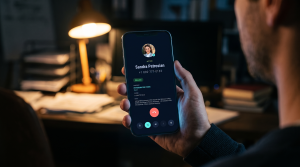
It puts your Google Contacts note on the incoming call screen. Name, company, job title and your own note, before you answer rather than after. Edit that note during or after the call and it writes the change straight back to Google Contacts. Your address book stays the single copy, and nothing important lives in a database of mine.
Because it reads your contacts instead of calling a server, it works offline. It also handles dual SIM on a per contact basis, so you can pick which of your numbers to call a given client from.
It is $9 a month, $49 a year, or $99 once and for good, with a 30 day trial and no free tier. Android only.
Where it is the wrong answer
I would rather tell you now than have you pay and find out in week three.
It does not transcribe or record anything. Do you want a written record of the conversation? Transcript Assist on a recent Galaxy does exactly that, and it is already on your phone. Use that instead.
It will not remind you to call anybody. No tasks, no follow-up dates, no pipeline. It shows you what you wrote. That is the whole job.
It is not a team product. One person, one address book. Do you need to hand a client to a colleague with the history attached? Then you need a real CRM, and you should go and buy one.
It cannot fix an empty notes field. The app shows what you have written. If you have never written anything, your first month is you building a habit rather than the app doing something clever.
So what should you actually do
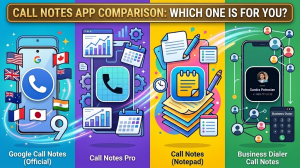
If you came here because a Pixel advert sent you hunting through your Galaxy settings, stop looking. Samsung has never had that feature and shows no sign of adding it. If you want the whole picture, I have since put the four things called call notes side by side.
Want a transcript of the conversation? Samsung already gives you one on recent devices at no extra cost. Use that before paying anybody for anything.
But perhaps you wanted something else entirely. You wanted to know who is calling and what you owe them, before you pick up. That is a different problem. Nobody at Samsung or Google is solving it, and it is the one I work on. The trial runs 30 days, which for most people who read this far is somewhere around three hundred calls. That is more than enough to know either way.